I developed my skills in Blender by participating in a global Blender competition.
How It Meets the Outcome
At first, I had no hope of getting into the top 100, but by leveraging the competition’s Discord community, I got a lot of useful feedback that helped me adjust my final submission.
Challenges Overcome
I managed tight deadlines (I submitted 5 minutes before the deadline) and improved my storytelling and lighting skills.
Lessons Learned
I learned the importance of having a solid idea and story first, and then fine-tuning the details.
Portfolio
×
Iterations 1 & 2
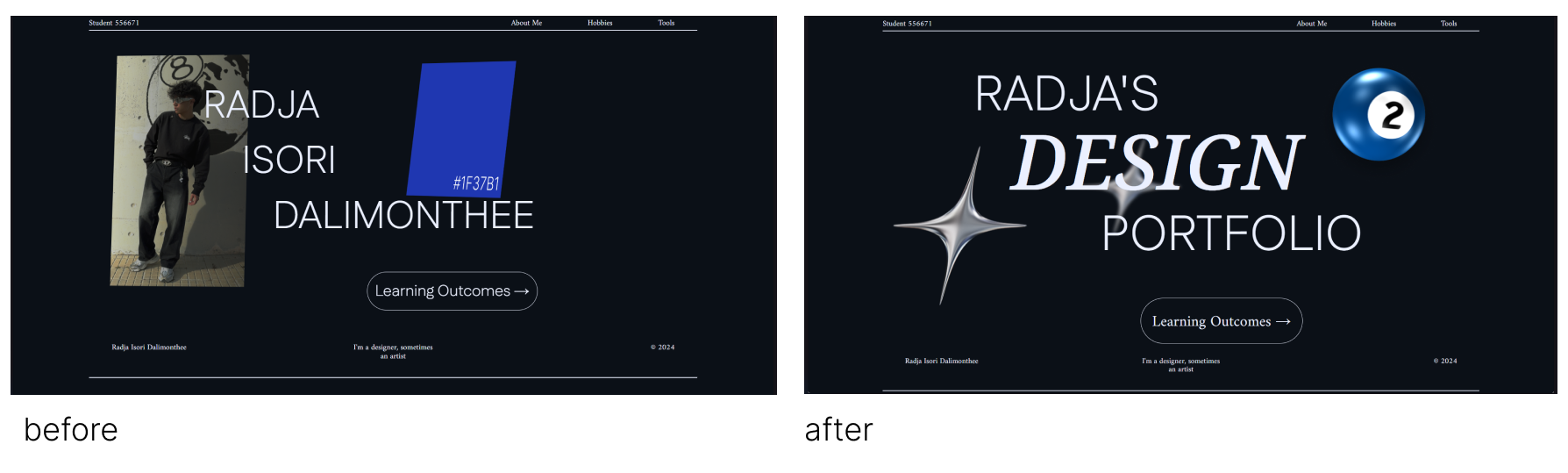
This was my first experience with how feedback affected my future design choices. After creating my first iteration, I was told by the teachers that the composition and choice of the images for the landing page were not matching with the style I was going for. This was based on the fact that my style was a dark theme, and therefore I had to change the images and even composition of the lettering. After creating the next iteration, I felt that the design had a much more solid and natural looking feel. This made me realize how important feedback is in the field of media since it’s what drives better designs every time.
Iterations 2 & 3
After showing my last iteration, I was told it looked much better than the first one, but that now it lacked a sense of direction or meaning. I replaced my 3D panels with a parallax effect, because of that I started brainstorming ideas on how I could give my design a story or meaning. I first made a broken light bulb because I thought it could symbolise “out of ideas” but then after looking for inspiration I saw an old windows wallpaper with a crack in the screen and revealing the binary code. So I went with this design and I ended up getting a more interesting and meaningful design, demonstrating how feedback can make each iteration better.
Group Project
×
Work in progress..
Paper Prototype for Group Project
What Was Done
I created initial wireframe sketches with my group for our project website. This process involved brainstorming ideas and sketching on paper to visualize the website's structure and functionality. The physical medium made it easier to communicate concepts and receive direct feedback from team members.
How It Meets the Outcome
This activity demonstrates the Interactive prototypes outcome. By starting with rough sketches and refining ideas based on team feedback, me and my team could quickly see how the website would work.
Challenges Overcome
Initially, my group struggled to visualize the website’s structure due to unclear ideas. Sketching on paper helped us overcome this by making concepts tangible. It also addressed communication barriers, as everyone could see and discuss changes in real time.
Lessons Learned
I learned the value of starting simple with sketches to clarify abstract ideas. This approach not only improved collaboration but also sped up the design process. In the future, I’ll prioritize early visual brainstorming to avoid miscommunication and ensure all team members share a clear vision.
Figma Prototype for Portfolio
What Was Done
I created a working Figma prototype for my portfolio website. This allowed me to visualize the website's look and feel directly on my computer, enabling navigation and design testing without needing to write any code.
How It Meets the Outcome
This activity aligns with the Interactive Prototypes outcome. By building a functional Figma prototype, I demonstrated the ability to create purposeful human-computer interaction. The prototype allowed me to test usability and visual design choices before development.
Challenges Overcome
A key challenge was ensuring the interactive elements, like buttons and navigation, functioned as intended. I resolved this by exploring Figma’s prototyping tools and testing interactions repeatedly to refine the user experience.
Lessons Learned
I learned that prototyping before development saves time and prevents design flaws. Seeing the interactive flow early revealed areas for improvement. Next time, I’ll seek feedback earlier to catch usability issues sooner and further refine the user experience.
In a small team, I created a quick paper prototype to display the "Project Organisation" learning outcome. I based my design on my current portfolio layout, allowing users to test and provide feedback. This approach helped me identify areas for improvement in my existing website.
How It Meets the Outcome
This activity demonstrates the Interactive Prototypes outcome. By creating a tangible paper prototype for user testing, I facilitated purposeful human-computer interaction. The feedback I received guided improvements to my website's design, ensuring it better meets user needs.
Challenges Overcome
A key challenge was ensuring the prototype was clear and functional enough for users to understand and navigate. I addressed this by mirroring my current portfolio layout, which made it familiar and easy to test. This approach resulted in more useful feedback.
Lessons Learned
I learned that simple paper prototypes can provide valuable insights into user experience. Using an existing layout sped up the process, but I realized the importance of remaining open to redesigns. In the future, I’ll focus on testing more diverse design concepts to explore better alternatives.
Group Project Survey
What Was Done
My team designed a survey to gather insights for our group project. We focused on general questions since our service targets a broad audience but aimed to identify key features to prioritize. I distributed paper surveys to Fontys students and workers, collecting 30 responses within an hour.
How It Meets the Outcome
This activity demonstrates the Target Group outcome. By gathering input from a diverse audience, I ensured that our project addressed user needs. The survey responses guided our feature prioritization, ensuring the final design aligned with the preferences of our target users.
Challenges Overcome
A challenge was crafting clear, general questions that would still yield useful insights. We solved this by focusing on simple, direct language. Distributing paper surveys also required extra effort, but it resulted in fast, high-volume responses.
Lessons Learned
I learned that direct user feedback is invaluable for shaping project direction. Collecting responses in person was faster than expected, but in the future, I’ll consider digital surveys for larger sample sizes or more diverse audiences. This approach would offer broader perspectives while still maintaining efficiency.
Creating a Persona
What Was Done
As part of a lecture, I created a user persona by defining their characteristics, needs, and frustrations. This activity allowed me to think critically about user motivations and how design solutions can address their pain points.
How It Meets the Outcome
This activity aligns with the Target Group outcome. By creating a user persona, I demonstrated an understanding of end-user needs and frustrations. This insight informed potential design solutions that better cater to the target audience’s expectations and preferences.
Challenges Overcome
A challenge was identifying meaningful frustrations that could lead to valuable design insights. I overcame this by focusing on common user pain points, which helped me think creatively about how to resolve them through design.
Lessons Learned
I learned that user personas are essential for user-centered design. Understanding frustrations helps pinpoint design opportunities. In future projects, I’ll spend more time researching real users to create more accurate personas and generate stronger, user-driven design solutions.